Press "Enter" to skip to content

Posts published in “Station Building”

Tower Installation Coming Soon

The site behind the DMI Research building where the SPARC station is located is being prepared for the tower. Click on photos to enlarge.
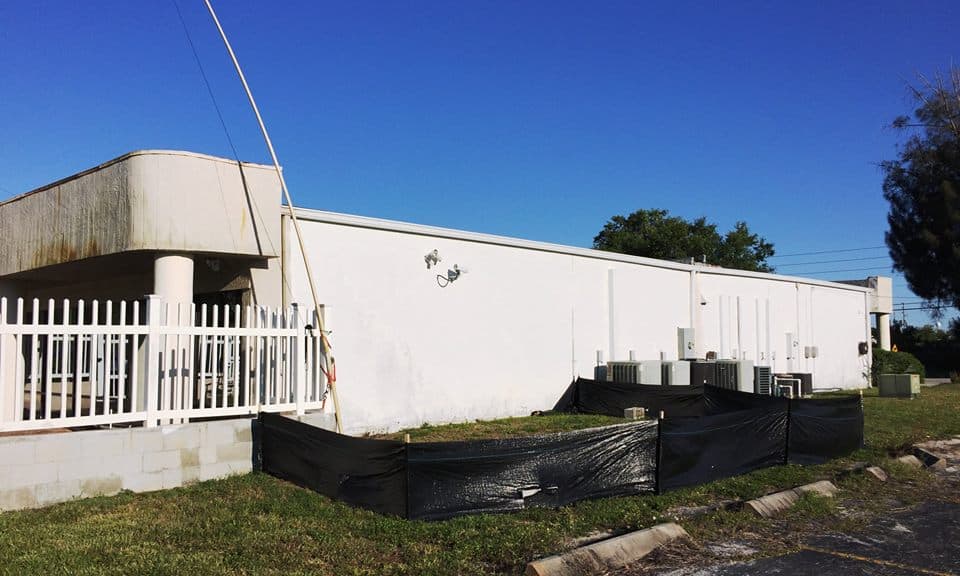
Tower siteA
Silt Fence (required by permit) Protects Grass From Sand

Next step is getting the dirt out that is in the way of the concrete (a.k.a. a BIG hole is needed). White paint marks the spot! The hole will be dug near the building foundation. The tower base will be angled to allow folding over with clearance for the fence and A/C units. John, KI4UIP reports the rebar is bought, cut and bent. Hole digging to start soon.


Tower Site1
Install Fold-Over Crank Up Tower Here

The Log Periodic antenna (20M-10M) and rotor that is currently on top of the parking lot container will be placed on the tower.

Tower site B
Relocate This Antenna./Rotor to Top of Tower

It ought to be a great antenna setup. Stay tuned for more details….


Related Images:

May Meeting Program Update

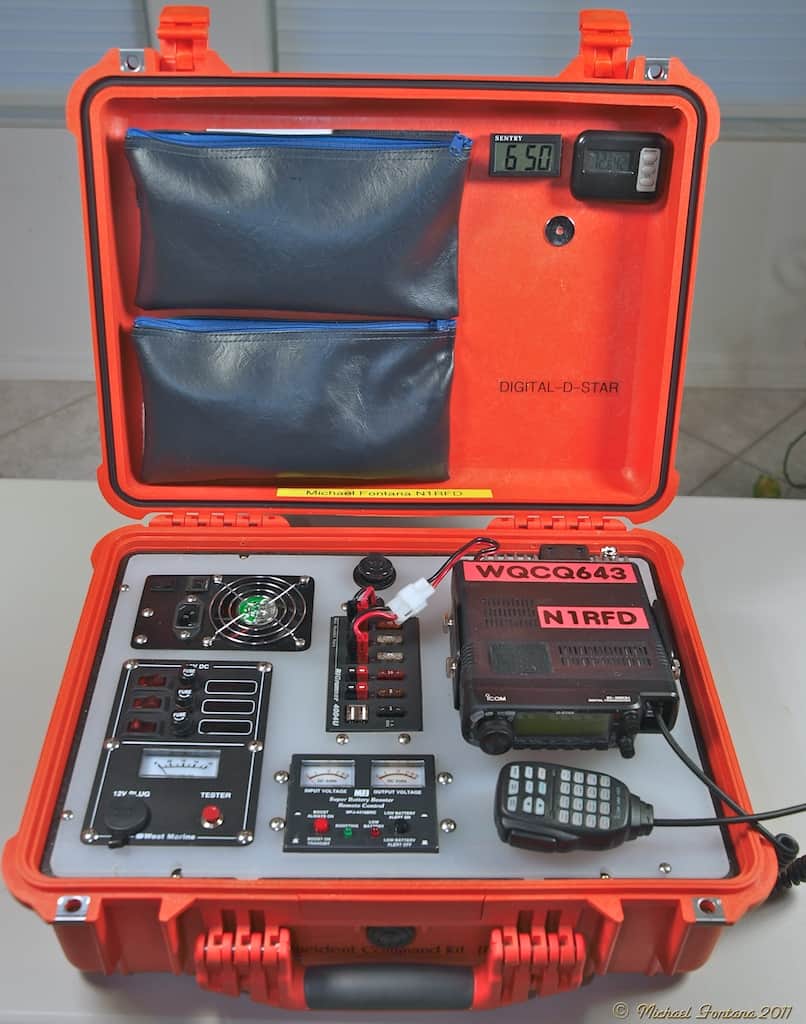
At the May 6th club meeting our program will include several examples of a “Go Box.” These portable communications centers can easily be

Sample Go Box
Sample Go Box

transported by one person, setup quickly and provide communications on different bands and modes during emergencies or other communication events..

Learn about their purpose, capabilities, how to plan and make your own. Our presenters will each demonstrate their own projects. We will hear from: Andy, KI4VOS; Udo, KF4KUL and
Clayton, KJ4RUS. We also plan to fire up some of the equipment as a demonstration.

There will be plenty of time to see the equipment up close and ask questions. Flexible communications capability is important for wide-spread emergency situations. As we approach hurricane season, this program should provide plenty of ideas on how to construct your own Go-Box.

Everyone is welcome to attend the club meeting, SPARC member or not, even if you don’t have a license.


Related Images:

A New R7 Vertical, Two Working FSK stations and One Step Closer on the K3 Remote Station…

Today (12/29/2015), several SPARC members met at the SPARC Clubhouse to work on several Here's what's happeningprojects to help with contesting and other activities at the W4GAC station. Bob N2ESP, John KI4UIP, Dave KR4U, Ron KP2N and Tom NY4I worked on various projects that needed to be done for this weekend’s ARRL RTTY contest. While John, Dave and Bob wrestled the Cushcraft R7 antenna into position outside and ran coax, the rest of us worked on tweaking the Elecraft K3 to work on RTTY FSK mode. For a reason that would become apparent, we could not properly decode signals that we knew were there. As it turns out, we had two issues: one on receive (RX) and one on transmit (TX). The RX issue was that the RTTY frequency was set different on the rig than on the MMTTY program. Once we figured this out, all went well with the receive part. But, then other stations were not decoding us properly. This was a simple issue of switching the FSK polarity to invert our mark and space. Now, it works! There is nothing like reading the manual :). The K3 station will use the Log periodic on 20 and the dipole on 80 along with the Alpha 9500 for 1000 watts. The R7 will be run on other bands as a multiplier station.

Tom NY4I hung around (rather than sit in traffic to Palm Harbor) to work on the K3 remote station. There are a few items that required finishing for the remote station. You may recall, our plan is to allow members to operate the K3 remotely thereby using the radio and antennas at W4GAC from home (great for those of us with limited antennas). After a few configuration issues and hooking up a speaker cable to the back of the K3, Tom was able to connect to the K3 with his K3/0 setup. At least it worked across the room! Not wanting to make any more changed with the contest upcoming, there is a small punch list of items to do to complete this project. This list included routing a few LAN cables, adding an external speaker to the K3 (through the Behringer mixer) and finalizing the inbound WAN ports for access. Please note the technical details were added intentionally to see if anyone has an interest in learning the nitty-gitty details of how remote stations work. If you like mixing hardware and software, it is quite a bit of fun to configure. be sure to ask Tom to help out on this project. There are always things to do and things to learn.

If you want to know how you can use the remote (even with using just your PC or Android device), please talk to Tom. Once the station is fully operational, we will do a training session for those interested.

Related Images:

Radio Testing to be Rescheduled

Ham Radio Tower & SparksSeptember is the middle of hurricane season.  In an effort to make sure that your handheld and mobile transceivers are in good operational shape. SPARC will be available to test your HT and/or (uninstalled) mobile rig on TBD at the club station. HF, VHF & UHF radios can be accommodated.

Our radio gurus, will setup their service monitors and our spectrum analyzer to checkout your transceivers.  Be sure the battery is fully charge and the rig works.

Related Images:

Adding a Second Receiver and DVR to the Elecraft K3 at the Club Station

On Friday, June 12, four of us met down at the station for lunch and then to work on the K3. The K3 that the club uses is a radio that was used in the WRTC-2014 contest held in New England last summer. As contest radios don’t really need a second receiver or a digital voice recorder (DVR), this K3 was not fitted with these options. As we also like to DX with the radios at SPARC, NY4I procured the parts for the radio to add the second receiver, upgrade to the new K3SYNA synthesizer and add the Digital Voice Recorder (SSB and CW memories).

Adding this kit took about 4 hours using the very well written Elecraft instruction manual. Dave KR4U led the build team with assistance from Tom, NY4I, John KI4UIP and Club President, Bob, N2ESP. We had the radio buttoned up but not tested plus Tom forgot to add the DVR so after taking the radio home for final testing, NY4I ended up taking the sub receiver out two more times to get it to work (I gave Dave some bad instructions on the order of filters). After the source of the issue was located, and a quick test on the trusty HP service monitor, it was time to tackle the DVR. This required removing the front panel of the radio and removing a board. The unfortunate thing is this was the exact same procedure that was used to add part of the second receiver. The moral of the story is when installing two kits at once, make sure you read both sets of instruction FIRST!

After about 2 hours (being extra careful), Tom, NY4I installed the DVR and all checked out well.

You might be asking how this helps the general club member. Besides this being one of the K3s we are using at Field Day, you now have access to world-class radio complete with a fully-independent sub-receiver and DVR. This makes DXing easier as you can also hear the other side of the pile-up. The DVR means you can record your voice and push a button to give your call in a contest. This is also the radio we use in the remote HF station available to SPARC members.

Our hope is that members want to get on the air and operate the station. We normally open the station the Saturday after the club meeting plus for contests. Other times are available—just ask someone. If you haven’t been down to the club station lately, make a point to come down during Field Day and see the setup. If you are a seasoned HF operator or a new general class ham looking to learn, we can help you use the station however you like. It is there to be used and the more the merrier.

KR4U starts work...
KR4U starts work…


IMG_1695
The K3 in pieces…


IMG_1696
Main receiver filter installation


IMG_1697
Sub Receiver Filter Board


IMG_1698
Complete view of the sub receiver PC board


IMG_1700
New K3SYNA synthesizer


Related Images:

Station Maintenance Update

Under the watchful eye of our station trustee, Dave, KR4U, some work occurred this weekend at the SPARC Club Station to support the Remote Station project, On Friday, station engineer John, KI4UIP and Don N4KII ran the rotor line and LAN drop from side one of the room over to the remote side (closest to the window). This allows the main network switch to go to the side that needs more LAN drops. Having the rotor cable allows the Green Heron RT-21 computer-controlled rotor interface to be next to the K3.

On Saturday, after the SPARC board meeting. John and Tom, NY4I worked on installing some more equipment. First was a plywood backing John fabricated to add to the wall under the table. This was to mount some equipment to allow remote control of the devices in the radio room.

  • First, we added the new LAN switch (8 port GigE with CAT7 shielded cabled to minimize RF interference).
  • Then, a Lantronix 4 port Ethernet to Serial server. This device allows someone to map a serial port from a PC across the Internet to control one of 4 serial devices. We have 3 devices that require serial control: Alpha 9500 amplifier, Green Heron Rotor Controller and the Elecraft W2 wattmeter. By having these devices available to the network, a remote user from home can monitor the power out of the station as well as turn the rotor with their local Logging program (like HRD, DXLabs, N1MM or WriteLog). Your local software just thinks it is talking to a local serial port, but in reality,the data is routed across the Internet to the device at the SPARC station. A great by-product of this is that the local computers can also talk to the serial devices over the network. This allows either station A or station B to control the rotor for example without having to run a 2nd serial cable across the room and switch them with an A/B switch.
  • The last item installed was a DLI Web Connected Power Switch. This device has 8 LAN controlled ports to allow switching and resetting of devices remotely. Say we are operating remotely and the Rotor controller stops responding. If necessary, we can issue a command that will turn the rotor controller’s power off and then turn it back on. This allows the advice to reset.The web power switch is also smart enough to ping any of the devices plugged into and if they stop responding, it cycles the power port to reset the device.

A goal of this system is to make sure that the station can be used locally for contesting operations and when people want to come in and operate. It’s secondary function is to operate remotely. The way this has been engineered is to make sure that both goals are supported without having to switch anything.

Tom stayed later to tie up a few loose ends including updating the firmware on the Alpha 9500 to version 3.03. This drastically improves the auto-tune algorithm. The amp is even easier to operate now. He also connected the serial interface from the K3 into he RemoteRig box so it is accessible both remotely and for local computer control via WriteLog.

The next thing to install is some beefier coax jumpers to replace a few pieces of RG-8X. These will be replaced with LMR-400 UltraFlex. The last major item before we start full remote integration testing is to add a automatic band decoder to allow the K3 to drive the selection of the antennas. This will make local operation too in that no manual switching of the antennas will be required. In the remote operation, this is really a requirement as we need to switch the antennas between the Log Periodic and the dipole.

Related Images:

WP2Social Auto Publish Powered By : XYZScripts.com